
The Continuous Discharge Certificate is the single most important document in an Indian seafarer’s career. If you’re wondering how to apply for CDC online, the entire process runs through the DGMA e-Governance portal.
CDC stands for Continuous Discharge Certificate. It functions as your seafarer’s passport, recording every sea service detail across your career. Without a valid CDC, you cannot legally join any merchant vessel for international voyages. The certificate is issued by the Shipping Master under DGMA and is valid for 10 years from the date of issue.
Quick terms: CDC = Continuous Discharge Certificate (your sea service record booklet). INDoS = Indian National Database of Seafarers (your unique 8-digit seafarer ID, required before CDC application). CoC = Certificate of Competency (qualification certificate for officers). STCW = Standards of Training, Certification and Watchkeeping (international safety training courses). MMD = Mercantile Marine Department (regional offices that process CDC applications).
How to Apply for CDC Online: Step-by-Step Guide
The CDC application runs through the official DGMA portal at https://dgma.gov.in/. Here’s the exact process of how to apply for CDC Online, as per the Seafarers’ Manual (April 2026):
Step 1: Log in to the e-Gov Portal
Visit https://dgma.gov.in/ and log in using your registered seafarer credentials. Your login ID is your INDoS number. If you haven’t registered on the portal yet, create an account first (you should have done this during your INDoS registration).
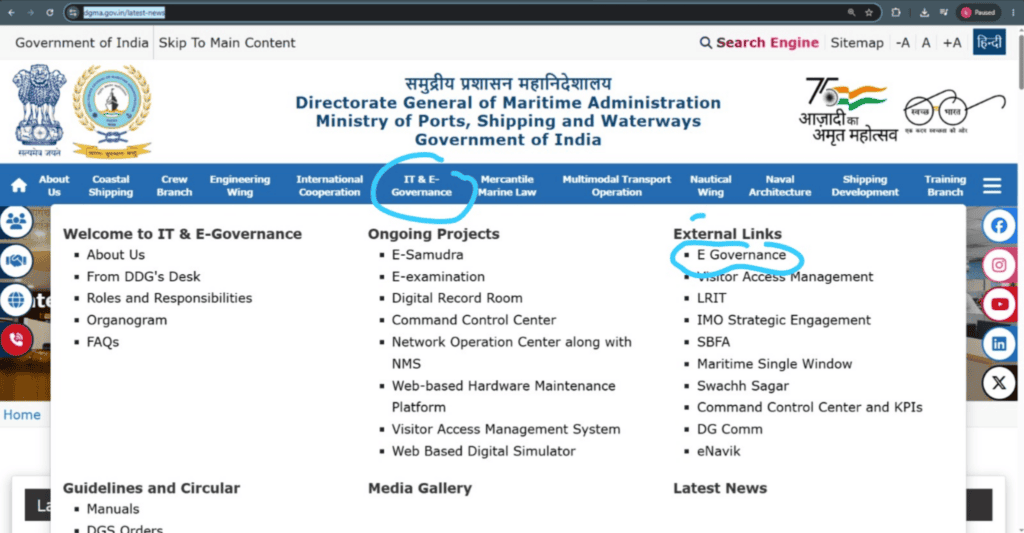
Tip: Use Mozilla Firefox for the DGMA portal. Multiple seafarers report compatibility issues with Chrome and Safari, especially during payment processing.
Step 2: Navigate to CDC Application
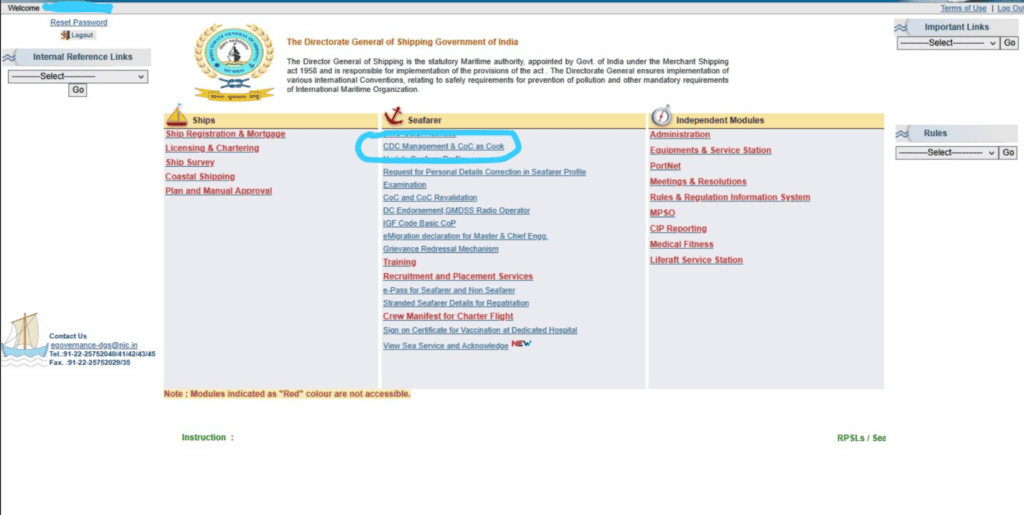
From the dashboard, go to Seafarer Services and select CDC Management & CoC as Cook. Before proceeding, make sure your INDoS profile is updated with your training details and medical certificate information. The application form pulls data from your profile, so outdated records will cause problems.
On the next screen, select Apply for New CDC
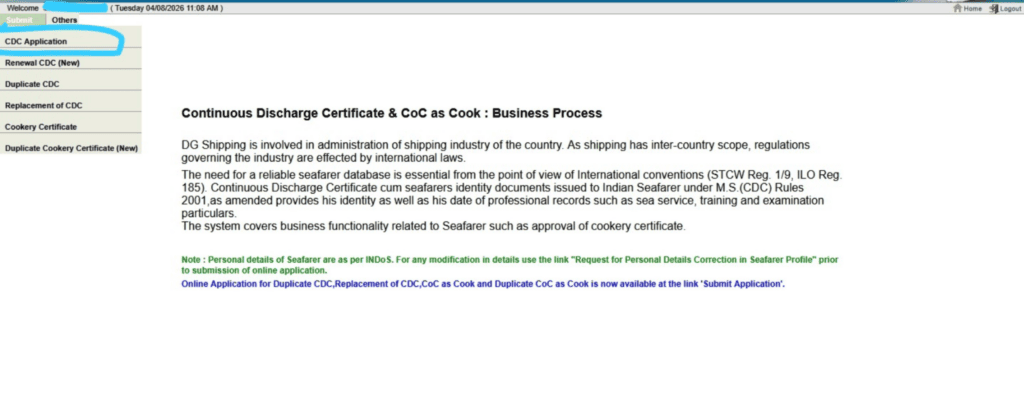
Step 3: Fill the Online Application Form
Enter all required details in the application form:
Personal details: full name (as on passport), date of birth, gender, nationality. Educational qualification: Class 10th board and year of passing. Passport number and current address. Pre-sea course details, including training institute name and course completion date. Medical certificate details, including the name of the approved doctor and examination date.
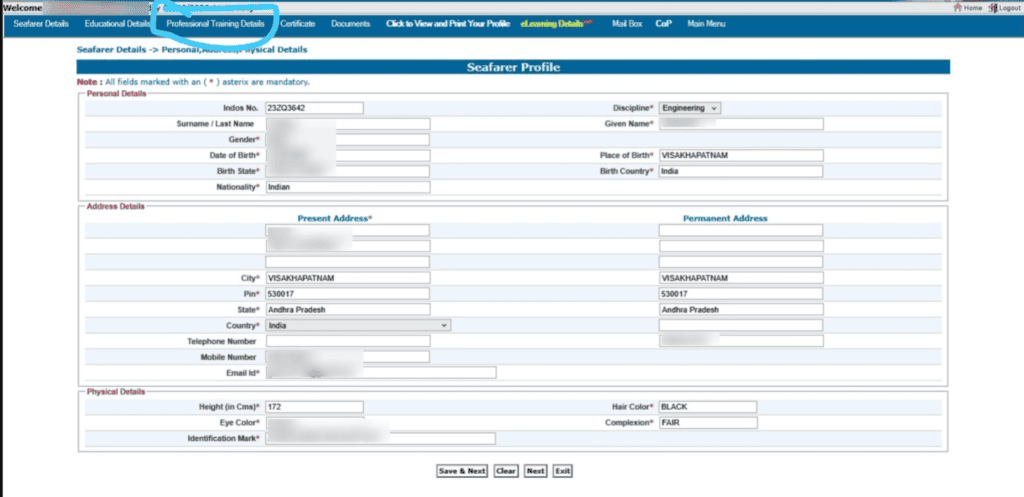
Tip: Every detail must match your supporting documents exactly. A single mismatch in name spelling, date of birth, or passport number between the form and your uploaded documents triggers rejection.
Step 4: Upload Required Documents
Upload colour-scanned copies of all required documents in PDF or JPEG format. The portal checks file format and size, so keep your scans clean and within the allowed limits.
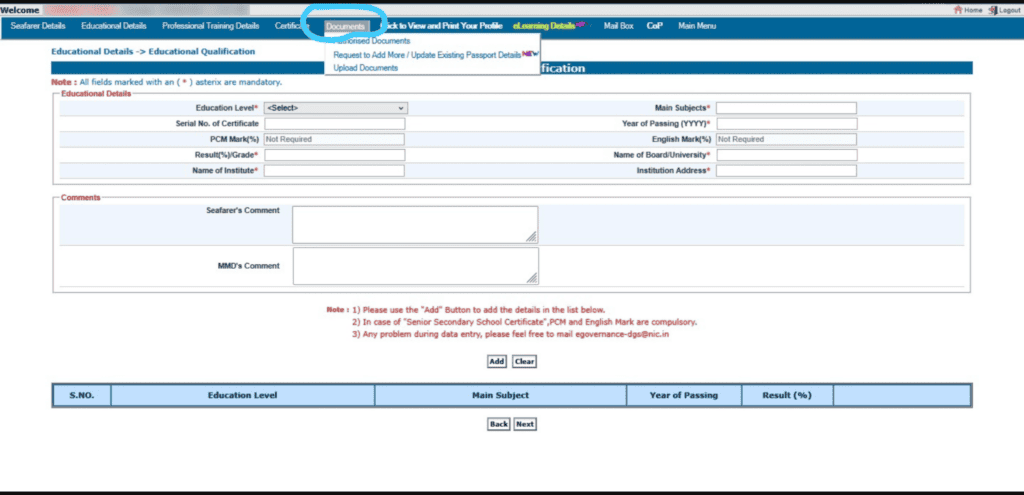
Required uploads: passport-size photograph (white background), self-attested passport copy, INDoS certificate, Class 10th marksheet, pre-sea course completion certificate, and medical fitness certificate.
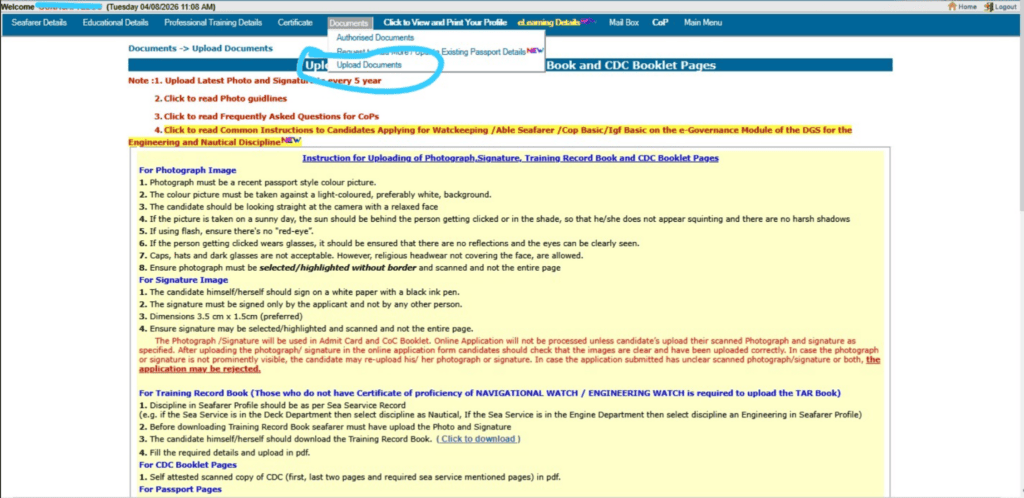
Tip: Blurry scans, cropped edges, and oversized files are common reasons for rejection. Use a proper scanner or a high-quality phone camera with good lighting. Preview each file before uploading.
Step 5: Payment of CDC Fee
Pay the CDC application fee of Rs. 700 through the integrated online payment gateway. The fee is non-refundable. If your application gets rejected for any reason, you’ll need to re-apply and repay. Download and save your payment receipt immediately after the transaction.
Tip: If your application is rejected due to a document mismatch and you need to reapply, you will pay the full fee each time. Getting everything right on the first attempt saves money.
Step 6: Submit the Application
Review every detail one final time. Check all uploaded documents for clarity and correctness. Once satisfied, click Submit. The system generates an application reference number. Save this number for tracking your application status.
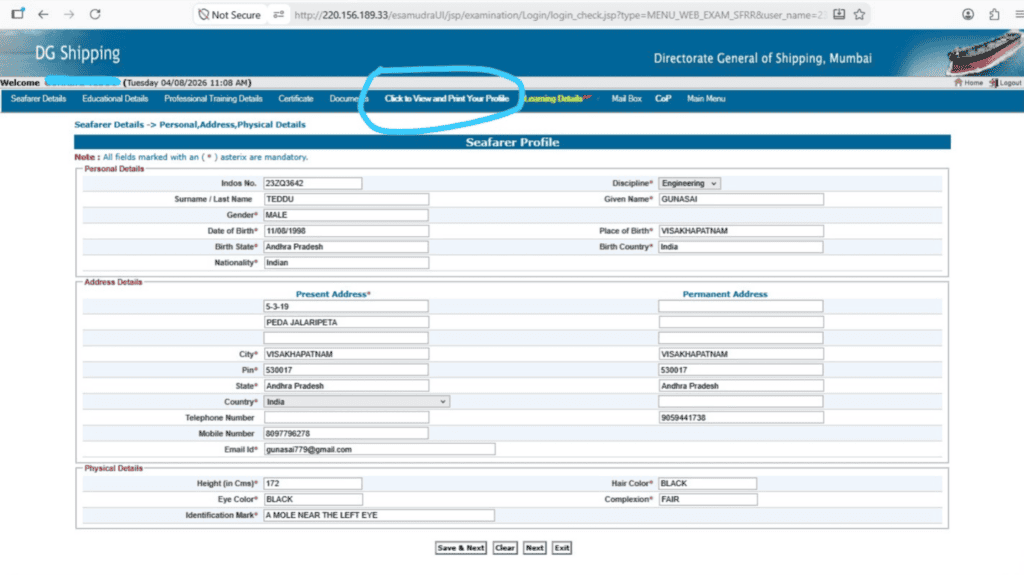
DGMA verifies your application and all uploaded documents. This happens at the Shipping Master’s office (Mumbai, Kolkata, or Chennai). Upon successful verification, the CDC is printed and dispatched to your registered address via Speed Post. Processing time is typically 7 to 15 working days after successful verification, though this varies by MMD.
CDC Eligibility Criteria: Who Can Apply?
Before learning about how to apply for CDC Online, you need to verify that you meet all CDC eligibility requirements. Missing even one criterion means automatic rejection, and the fee is non-refundable:
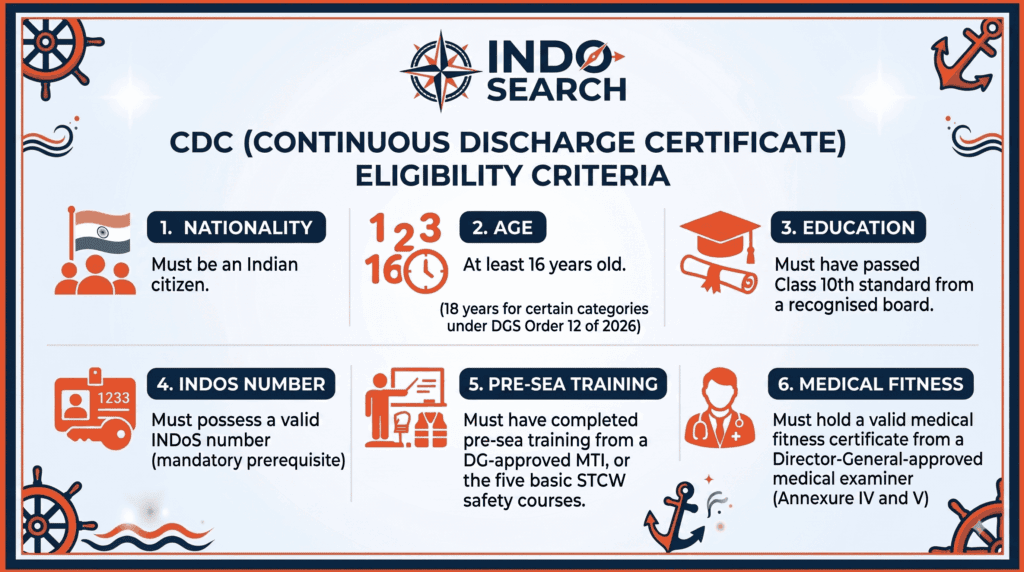
Important note on DGMA Order 12 of 2026: Effective 1st August 2026, the eligibility criteria for CDC issuance have been revised to enhance seafarer quality standards. Under the new rules, completion of the five basic STCW courses alone may no longer qualify a candidate. Check the latest CDC eligibility criteria 2026 rules for the updated requirements before applying.
If you haven’t completed your pre-sea training yet, explore the full list of DGMA-approved maritime training courses and approved MTIs on the IndoSearch directory.
Documents Required for CDC Application
Gather all documents before you start. Every document must be uploaded in PDF or JPEG format, scanned in colour, and clearly legible:
| Document | Format / Notes |
| Passport-size Photograph | Recent, white background, clear face visible, colour scan |
| Valid Indian Passport | Colour scanned copy of pages showing personal details, photo, address, and passport authority signature |
| INDoS Certificate | Scanned copy of your INDoS certificate or Master Checker printout |
| Class 10th Marksheet / Pass Certificate | Colour scanned copy of original |
| Pre-Sea Course Completion Certificate | From a DG-approved MTI; must match your INDoS training records |
| Medical Fitness Certificate | From a DGMA-approved doctor (Annexure IV and V); must be current |
| Permanent Address Proof | Any one: Passport, Aadhaar Card, Voter ID, or Permanent Driving License |
About the medical certificate: This must come from a DGMA-approved doctor. The examination covers Annexure IV (general fitness) and Annexure V (eyesight/hearing). Certificates from non-approved doctors will be rejected.
CDC Renewal, Duplicate, and Replacement
When to Renew Your CDC
Renewal is required in two situations: your CDC has expired (10 years from issue date), or all pages have been used up with sea service entries. You can apply for renewal within one year preceding the expiry date.
The renewal process mirrors the fresh application: log in to the e-Gov portal, navigate to CDC Management > Renew CDC, fill in your passport details and reason for renewal, upload the old CDC scan (front and relevant pages), passport photo, passport copy, and updated medical certificate if needed. Pay the fee and submit. The renewed CDC is dispatched via Speed Post.
Duplicate CDC (Lost or Stolen)
If your CDC is lost, stolen, or irreparably damaged, you’ll need a duplicate. The process requires additional documentation:
1. File a police complaint or make a logbook entry/enquiry report (as applicable).
2. Obtain an affidavit on Rs 100 stamp paper stating the circumstances of the loss and affirming ownership.
3. Log in to the portal and select ‘Apply for Duplicate CDC’. Upload: FIR copy (signed and stamped), affidavit (notarised), old CDC copy (if available), passport photo, passport copy, INDoS certificate, and medical fitness certificate (optional).
4. Pay the fee and submit. The issuing authority verifies and dispatches the duplicate CDC via Speed Post.
Special case: If the CDC was lost due to fire onboard a vessel or any other marine peril, no fee is charged for re-issuance.
Replacement CDC (Damaged or Detail Changes)
If your CDC is damaged, illegible, or worn out, or if you need corrections to printed entries (passport number, name correction), follow the same process as duplicate CDC. The only difference: instead of the FIR, upload a damage explanation letter and the original damaged CDC.
CDC in the Context of Your Maritime Career
The CDC is the second step in your documentation chain, right after INDoS registration. Here’s where it fits:
| Career Stage | Documentation Status |
| INDoS Registration | First step. 8-character ID issued. Gateway to MTI admission. |
| Pre-Sea Training at Approved MTI | Complete training at a DG-approved institute. Training records update to INDoS profile. |
| CDC Application | Apply online after completing pre-sea training. Avail in 7-15 working days. |
| STCW Certifications | Enrol in safety courses (Basic Training, PSSR, EFA, etc.) using your INDoS and CDC. |
| First Sea Service (Cadet/Rating) | CDC records your first contract, vessel name, rank, and service dates. |
| Career Progression | CoC applications, advanced courses, promotions, all linked to your CDC and INDoS. |
| BSID Application | Apply for Biometric Seafarer Identity Document using your INDoS number. |
Whether you’re entering the industry through a GP Rating Course, a DNS programme, or an Electro-Technical Officer course, the CDC application comes after your pre-sea training is complete. Plan the sequence: INDoS first, then MTI admission, then training, then CDC.
Seafarers who maintain their documentation properly, including a valid CDC, are eligible for various SWFS welfare schemes administered by the Seafarers’ Welfare Fund Society. A valid CDC is required for most welfare claims, so keeping it current protects both your career and your access to financial support.
Common Mistakes and How to Avoid Them
Name mismatch across documents. If your name on the application form doesn’t match your passport, INDoS certificate, and Class 10th marksheet character for character, the application will be rejected. Verify spelling before submitting.
Uploading blurry or cropped scans. The verification team examines every uploaded document. If they can’t read your marksheet, passport details, or medical certificate, they’ll reject the application. Use a scanner, not a phone camera in poor lighting.
Applying before INDoS profile is updated. The CDC application pulls data from your INDoS profile. If your pre-sea training records or medical certificate details haven’t been updated in INDoS, the form will show incomplete information.
Using a non-approved doctor for the medical certificate. The medical fitness examination must come from a DGMA-approved doctor using the prescribed Annexure IV and V formats. Certificates from unapproved doctors are automatically rejected.
Not tracking the application after submission. Many seafarers submit and forget. Check your application status regularly on the portal. If something needs correction, you’ll find out sooner rather than at the last minute before your contract begins.
Applying through unofficial websites. The only legitimate portal for CDC application is dgshipping.gov.in. Several fake websites mimic the DGMA portal. Never share your INDoS credentials or payment details on any other site.
Key Takeaways
• The CDC is a mandatory identity and sea service document, valid for 10 years, issued by the Shipping Master under DGMA.
• The application is entirely online through the DGMA e-Governance portal. No manual applications are accepted.
• Application fee is non-refundable. If rejected, you pay again on re-application.
• Eligibility requires: Indian citizenship, Class 10th passed, age 16+, valid INDoS, completed pre-sea training, and medical fitness from a DG-approved doctor.
• DGMA Order 12 of 2026 (effective 01.08.2026) revises eligibility criteria and raises quality standards. Check the updated rules before applying.
• Processing time is 7-15 working days after verification. The CDC is dispatched via Speed Post.
• CDC renewal is required after 10 years or when pages run out.
• No fee is charged if the CDC was lost due to fire onboard or marine peril.
• Use Mozilla Firefox for the DGMA portal. Other browsers have known compatibility issues.
Frequently Asked Questions
1. What is a CDC in the Merchant Navy?
CDC stands for Continuous Discharge Certificate. It is an official identity and sea service record document issued to Indian seafarers by the Shipping Master under DGMA. It records all your shipboard engagements, ranks, and voyage details throughout your career.
2. How to apply for CDC online?
Log in to the DGMA e-Governance portal at dgma.gov.in using your INDoS number, navigate to Apply for New CDC under Seafarer Services, fill the application form, upload your documents in PDF/JPEG format, pay fees, and submit. The CDC is verified and dispatched via Speed Post within 7-15 working days.
3. What is the fee for CDC application?
The CDC application fee is Rs 700, payable online through the portal’s payment gateway.
4. What documents are required for CDC application?
You need a passport-size photograph (white background), colour-scanned copies of your passport, INDoS certificate, Class 10th marksheet, pre-sea course completion certificate, medical fitness certificate from a DG-approved doctor, and a permanent address proof.
5. Can I apply for CDC without an INDoS number?
No. A valid INDoS number is a mandatory prerequisite. The CDC application form requires your INDoS number, and the portal pulls data from your INDoS profile. Complete INDoS registration first.
6. How long does it take to get a CDC after applying?
Processing time is typically 7 to 15 working days after successful verification. The CDC is then dispatched via Speed Post. Actual delivery depends on postal timelines and the MMD processing your application.
7. How long is the CDC valid?
The CDC is valid for 10 years from the date of issue. Renewal is required upon expiry or when all pages are used up with sea service entries. You can apply for renewal within one year before the expiry date.
8. What is the minimum age for CDC?
The minimum age is 16 years as per the Seafarers’ Manual. However, DGMA Order 12 of 2026 may specify 18 years for certain categories. Check the latest eligibility criteria before applying.
9. What if my CDC application gets rejected?
You’ll receive a notification through the portal stating the reason for rejection. Common causes include document mismatches, blurry scans, or incomplete INDoS profiles. You’ll need to correct the issue and re-apply with a fresh Rs 700 payment.
10. How do I apply for a duplicate CDC if mine is lost?
File a police complaint (FIR), obtain an affidavit on Rs 100 stamp paper, then apply through the e-Gov portal under ‘Apply for Duplicate CDC’. Upload the FIR, affidavit, old CDC copy (if available), passport photo, passport copy, and INDoS certificate. Pay the fee and submit.
11. Is there a fee waiver for CDC lost at sea?
Yes. If the CDC was lost due to fire onboard a vessel or any other marine peril, no fee is charged for re-issuance. You’ll need supporting documentation from the vessel’s master or shipping company.
12. Can I apply for CDC renewal online?
Yes. All CDC renewal applications must be submitted online through the e-Gov portal. Navigate to CDC Management > Renew CDC, upload the required documents including a scan of your old CDC, pay the fee, and submit.
13. What is DGMA Order 12 of 2026?
DGMA Order 12 of 2026, effective 1st August 2026, revises the eligibility criteria for CDC issuance and enhances seafarer quality standards. Under the new rules, completion of five basic STCW courses alone may no longer qualify a candidate. Check the full order for updated requirements.
14. Which browser should I use for the DGMA portal?
Mozilla Firefox is recommended. The DGMA e-Governance portal has known compatibility issues with Chrome and Safari, particularly during payment processing and form submission.
15. Can I surrender or cancel my CDC?
Yes. A CDC holder who wishes to permanently discontinue sea service may apply to the issuing Government Shipping Office for cancellation. The cancelled booklet may be returned with appropriate endorsements for record purposes. An Indian CDC holder who acquires foreign nationality or OCI status must surrender the Indian CDC.
Conclusion
The CDC application process is a straightforward seven-step online workflow as explain in length above. If you’re just starting your maritime career, the sequence matters: INDoS registration first, then admission to an approved maritime training institute, then pre-sea training, then CDC application. Make sure you meet the updated CDC eligibility criteria under the 2026 rules before applying.
Need help finding a DGMA-approved course or an approved MTI near you? Use the IndoSearch directory. For information on seafarer welfare benefits, check our guide on SWFS welfare schemes.