
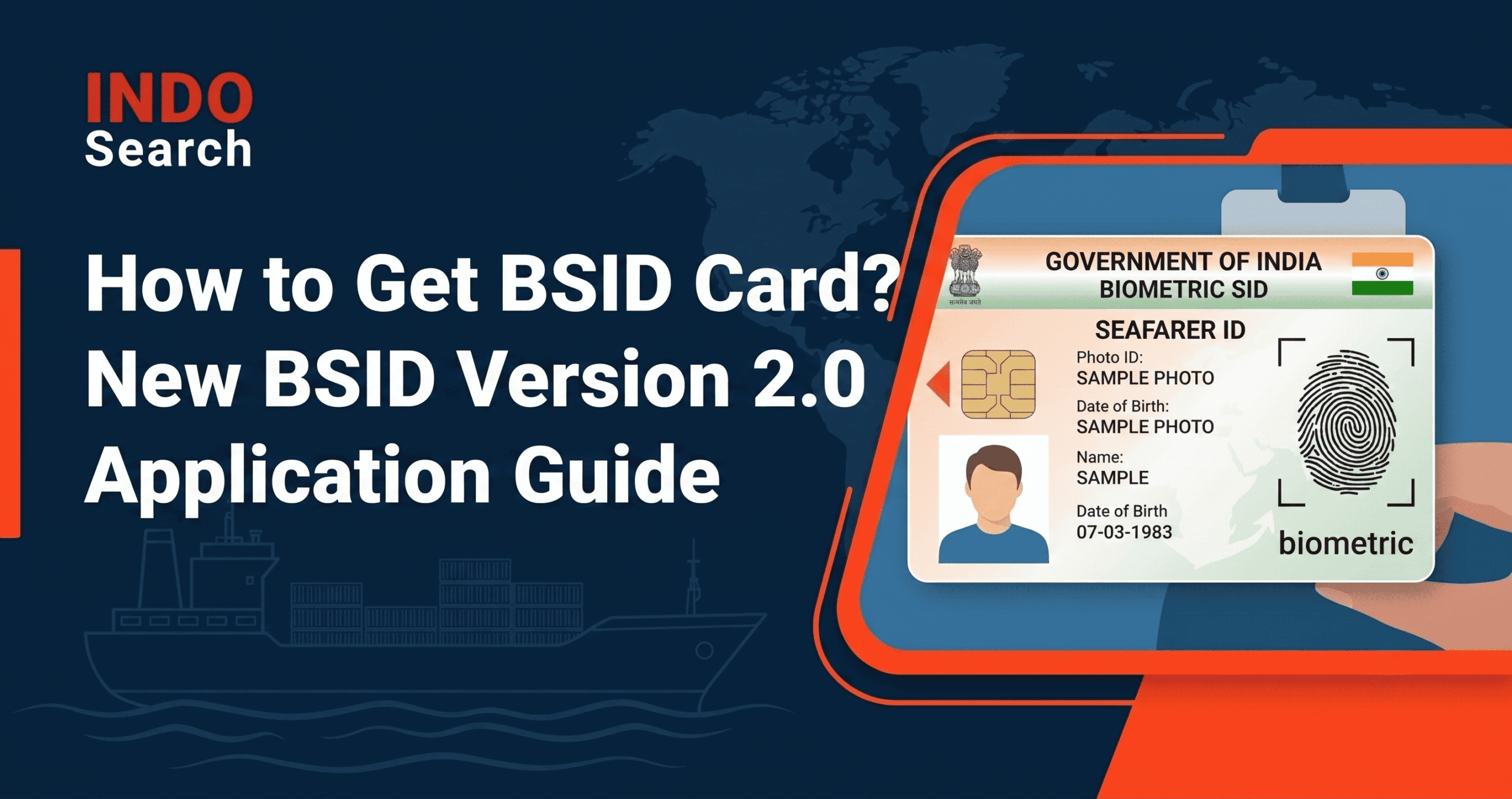
The Directorate General of Maritime Administration (DGMA) has rolled out BSID Version 2.0 for issuance of the Biometric Seafarer’s Identity Document to Indian seafarers, effective 1st August 2026, via DGMA Circular No. 44 of 2026. If you’re wondering how to get BSID card under this updated system, the answer is simpler than the old process. The new portal handles fresh applications, renewals, duplicate requests, and card replacements, all from a single interface. Over 4 lakh BSID cards have been issued to Indian seafarers since the system first launched in 2019, and Version 2.0 is designed to fix the problems that plagued the old module.
Quick terms: BSID = Biometric Seafarer’s Identity Document (your chip-based identity card). CDC = Continuous Discharge Certificate (your sea-service record booklet). INDoS = Indian National Database of Seafarers (your unique seafarer ID number). SID = Seafarer’s Identity Document (the generic term; BSID is the biometric version). CDAC = Centre for Development of Advanced Computing (the agency that built the BSID 2.0 platform). OTP = One-Time Password (sent to your registered mobile during login).
How to Apply for BSID Card Online: Step-by-Step Guide
The BSID 2.0 application is handled through the official portal. The following steps are based on the official CDAC-prepared BSID V2.0 Seafarer User Manual annexed to DGMA Circular No. 44 of 2026. Here’s exactly what to do:
Step 1: Update Your DGMA INDoS Profile
Log into your Biometric Seafarer Identity Document Portal and verify that all personal details, including your name, date of birth, CDC number, passport number, and contact information, are accurate and up to date.
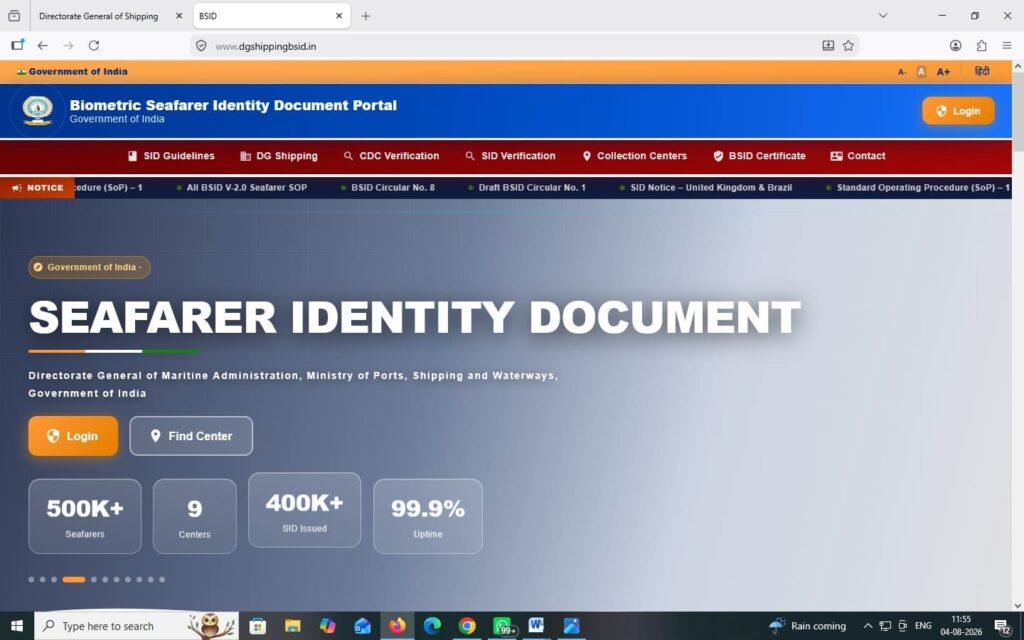
Tip: Do this BEFORE opening the BSID portal. The SID application form pulls data directly from your INDoS profile. If anything is wrong here, the form will auto-fill incorrect information that you cannot edit during the application. Mismatched data between your INDoS profile and your actual documents is the single most common reason for application rejection.
Step 2: Log in to the BSID 2.0 Portal
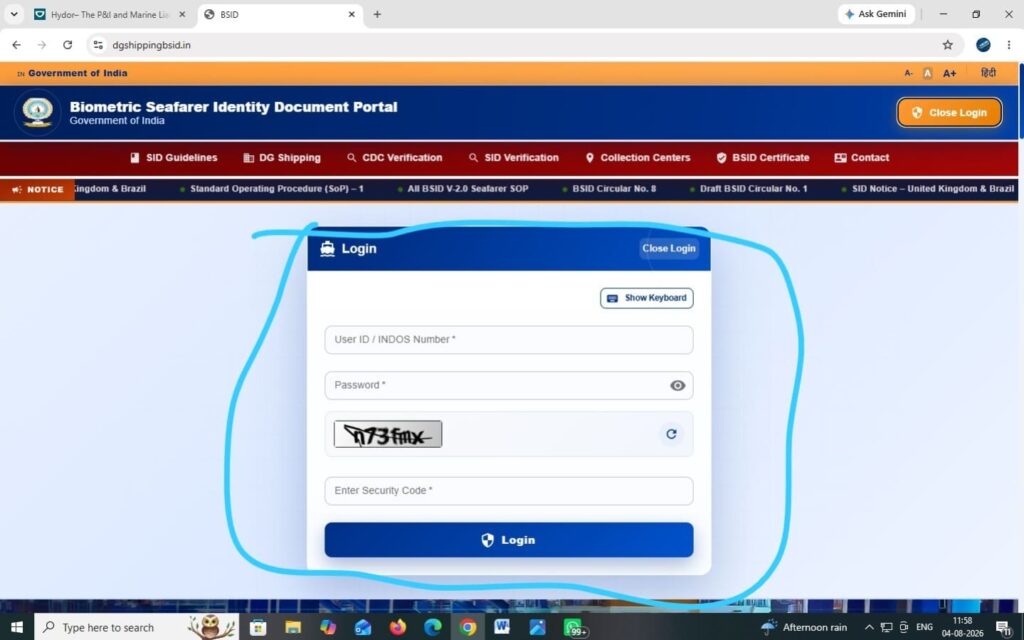
Visit the official BSID portal and log in using your INDoS number as your User ID and your INDoS password. After entering your credentials and the security code (CAPTCHA), you’ll receive an OTP on your registered mobile number. Enter the OTP to complete authentication.
After entering your credentials and the security code (CAPTCHA), you’ll receive an OTP on your registered mobile number. Enter the OTP to complete authentication.
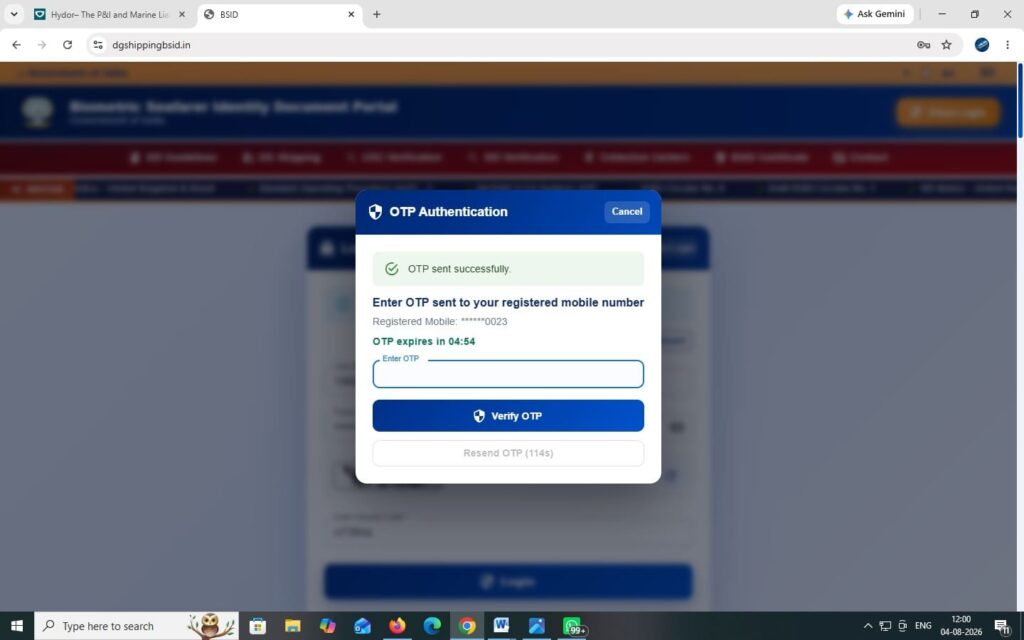
Tip: OTP verification is new in Version 2.0. Make sure the mobile number linked to your INDoS profile is active and accessible. If you’ve changed your phone number, update it in your Directorate General of Maritime Administration (DGMA) profile before attempting to log in.
Step 3: Navigate to the Dashboard and Select ‘Apply for SID’
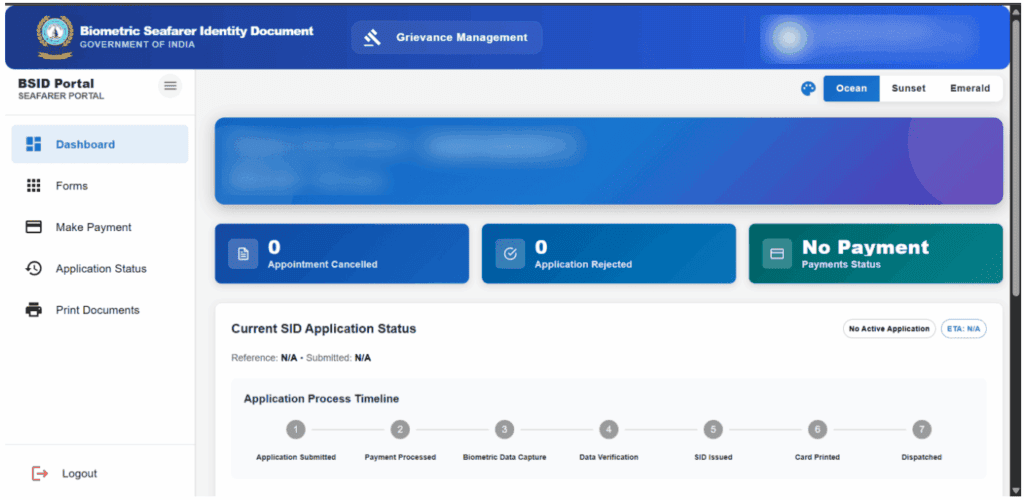
After login, you’ll see the BSID Portal Dashboard showing your current SID application status (if any), the number of cancelled appointments, rejected applications, and payment status.
The dashboard also displays the Application Process Timeline with seven stages: Application Submitted, Payment Processed, Biometric Data Capture, Data Verification, SID Issued, Card Printed, and Dispatched.
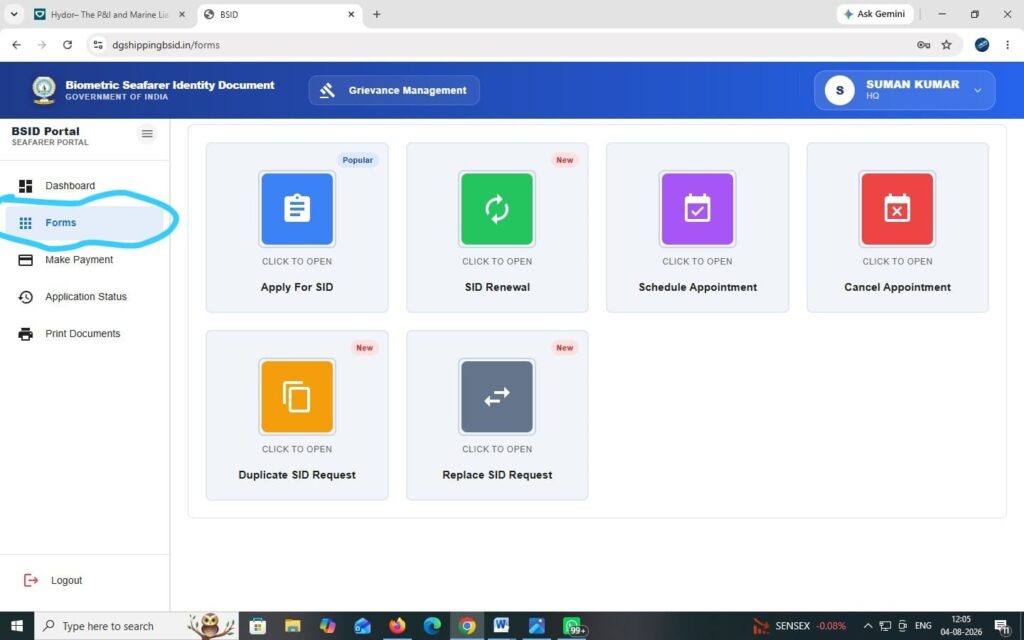
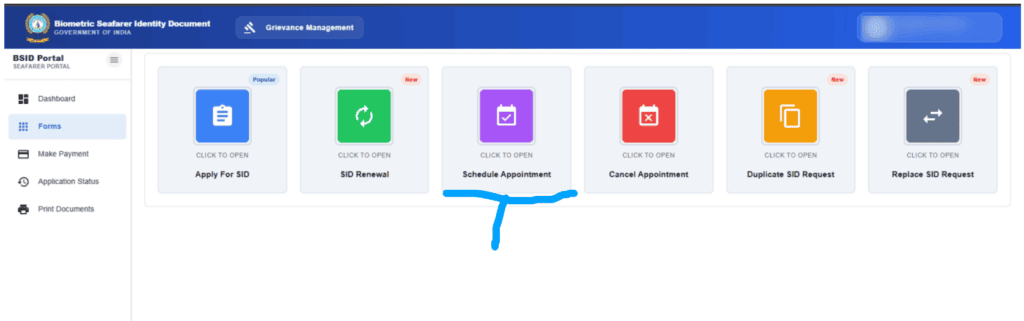
Go to the Forms section from the left-hand menu. You’ll see six options: Apply for SID (fresh application), SID Renewal, Schedule Appointment, Cancel Appointment, Duplicate SID Request, and Replace SID Request. For a first-time application, select Apply for SID.
Step 4: Verify Your INDoS and CDC Details (Section 1)
The form displays your INDoS number, CDC number, date of issue, issuing authority, CDC issue date, and CDC expiry date. All of this is pulled automatically from your INDoS profile. Verify every field carefully.
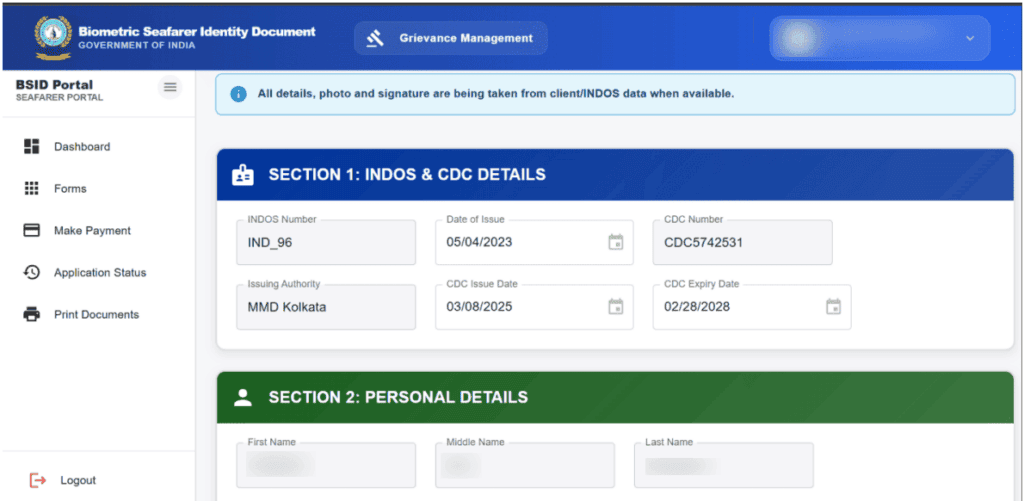
Tip: You cannot edit these fields in the application form. If anything is incorrect, stop here and correct your profile through the Directorate General of Maritime Administration (DGMA) Portal first. The SID application should only be completed after ensuring that all INDoS details are accurate.
Step 5: Verify Your Personal Details (Section 2)
The form auto-fills your first name, middle name, last name, father’s name, date of birth, sex, nationality, place of birth, email address, mobile number, height (in cm), and identification marks. Again, all of this comes from your INDoS profile. Check every field against your passport and CDC.
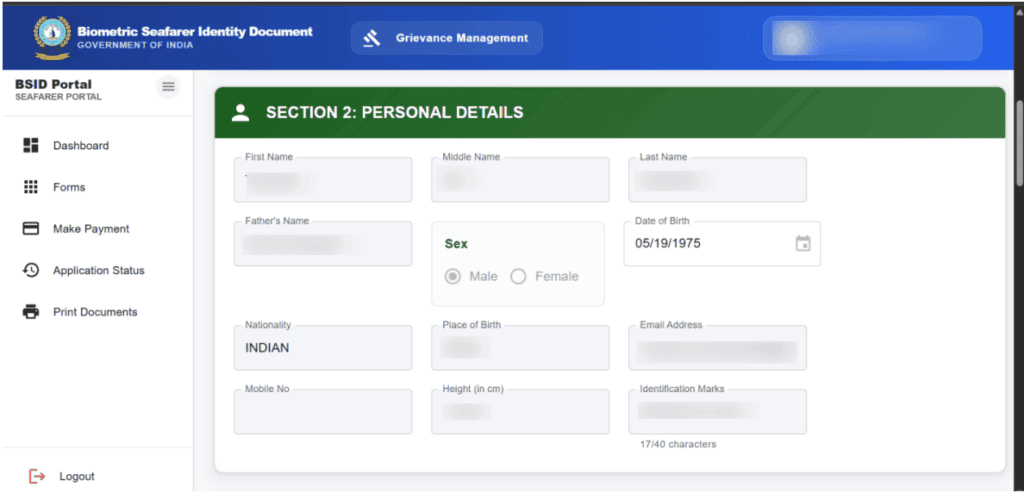
Step 6: Fill the Dispatch Address (Section 3)
This is the only section you fill manually. Enter the complete address where you want your BSID card delivered via Speed Post: house number, street, village/post office/tehsil, district, state, PIN code, phone number with STD code, and nearest police station.
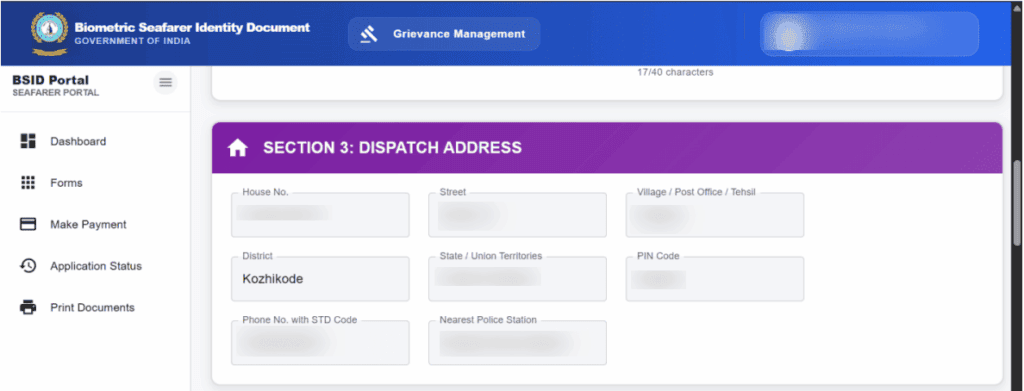
Tip: Use a reliable address where someone can receive a Speed Post AD delivery. If you’re frequently at sea, use a family member’s address. The card won’t be re-dispatched if the first delivery attempt fails.
Step 7: Complete Other Details (Section 4)
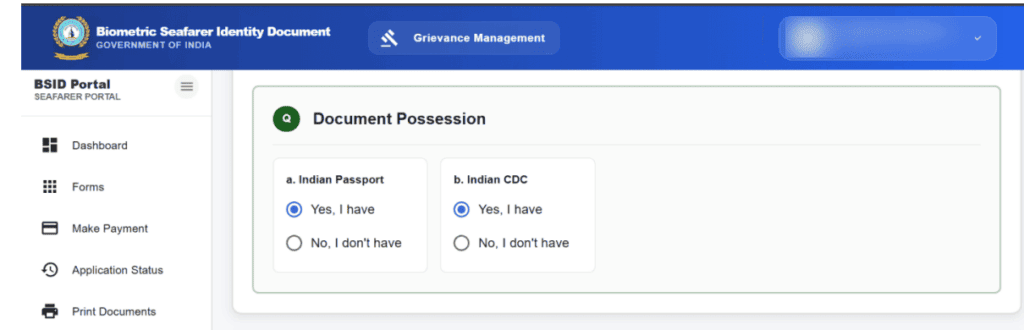
Answer whether you’ve applied for SID before and declare your debarment status for both CDC and SID (select ‘Yes, I am debarred’ or ‘No, I am not debarred’). Also confirm whether you currently possess a valid Indian Passport and Indian CDC.
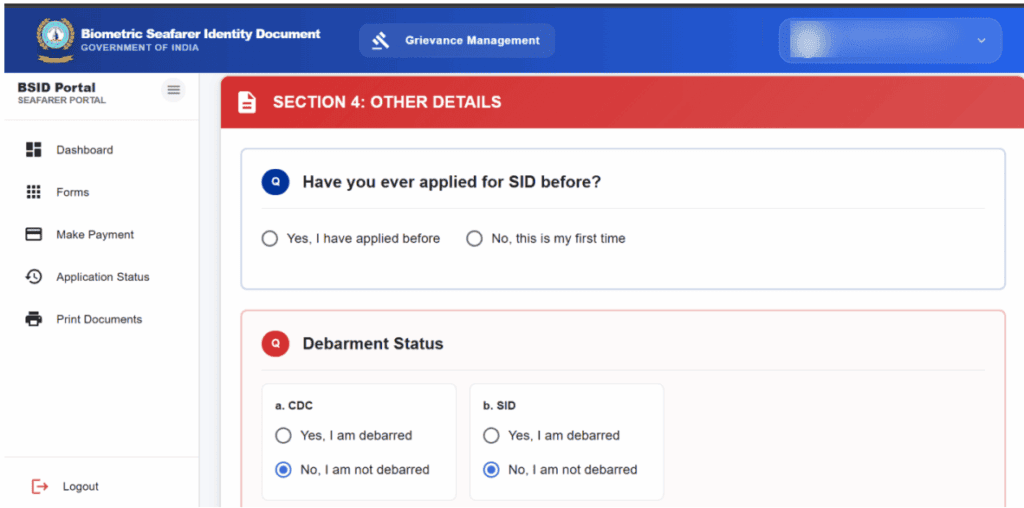
Tip: Answer honestly. Selecting the wrong debarment status or misrepresenting your document possession can result in application rejection or, worse, delays that surface when you’re trying to join a vessel.
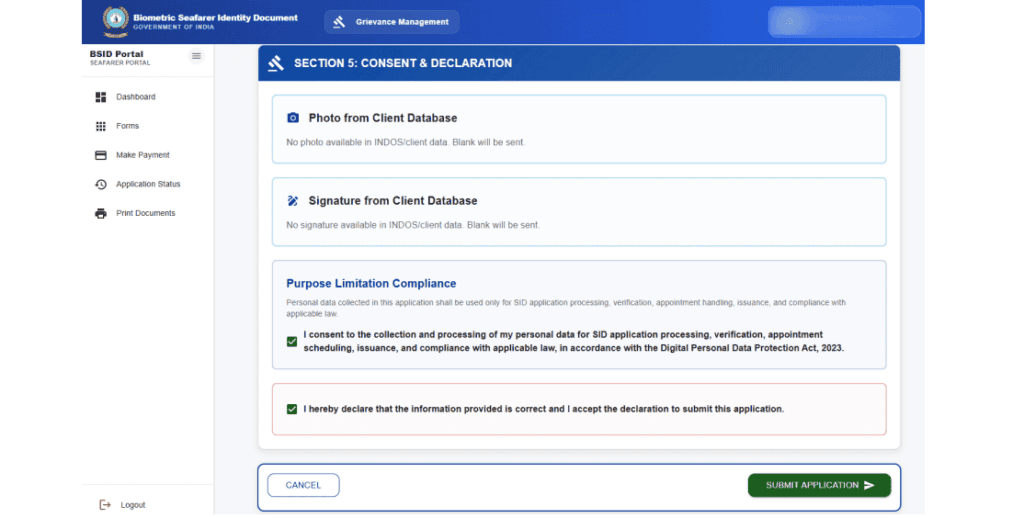
Step 8: Review Consent & Declaration, Then Submit (Section 5)
The form displays your photo and signature from the INDoS/client database (note: these are for your BSID profile only and will not appear on the physical SID card). The actual photo and signature on your card are captured during the biometric data capturing appointment.
Review the Purpose Limitation Compliance statement, which confirms that your personal data will be used only for SID processing, verification, appointment handling, and issuance, in accordance with the Digital Personal Data Protection Act, 2023. Check the consent and declaration boxes, then click Submit Application.
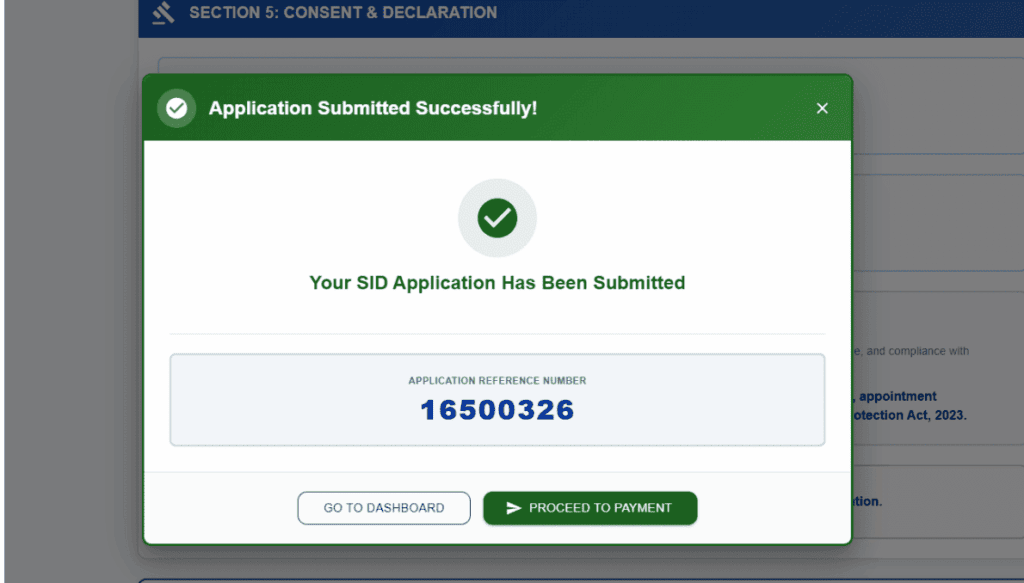
On successful submission, you’ll see a confirmation with your Application Reference Number. Save this number. You can then proceed directly to payment or return to the dashboard.
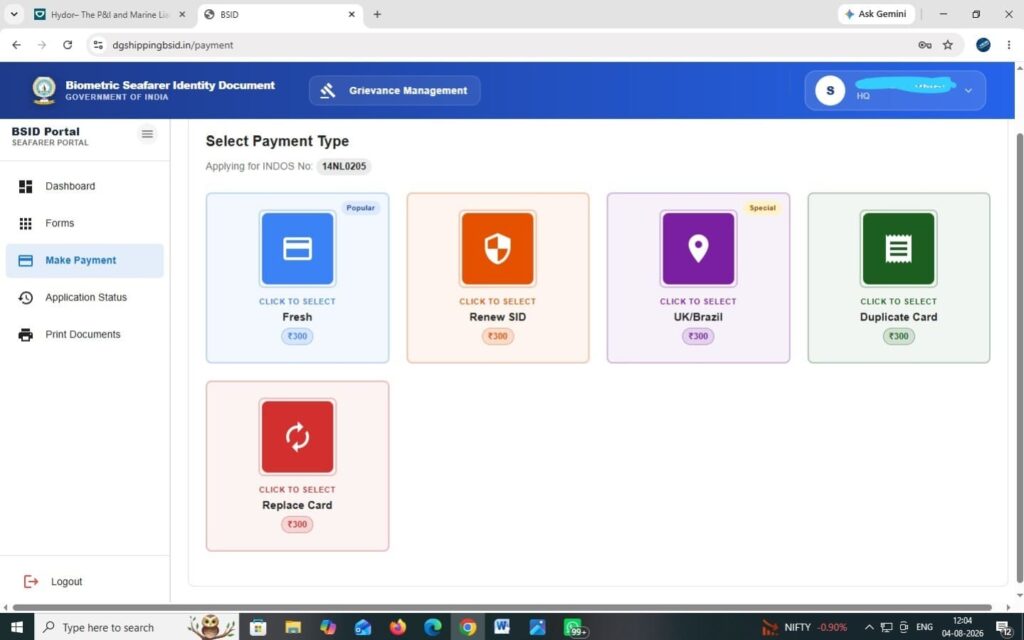
Step 9: Make Payment
From the Make Payment section, select the appropriate payment type based on what you need.
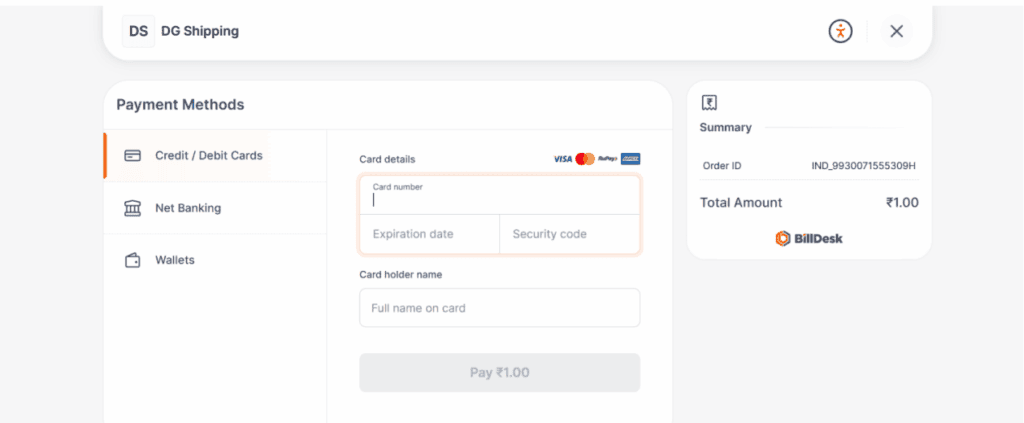
Payment is processed via the BillDesk gateway. You can pay using credit card, debit card, net banking, or wallets.
After successful payment, download the receipt by clicking the Download Receipt button.
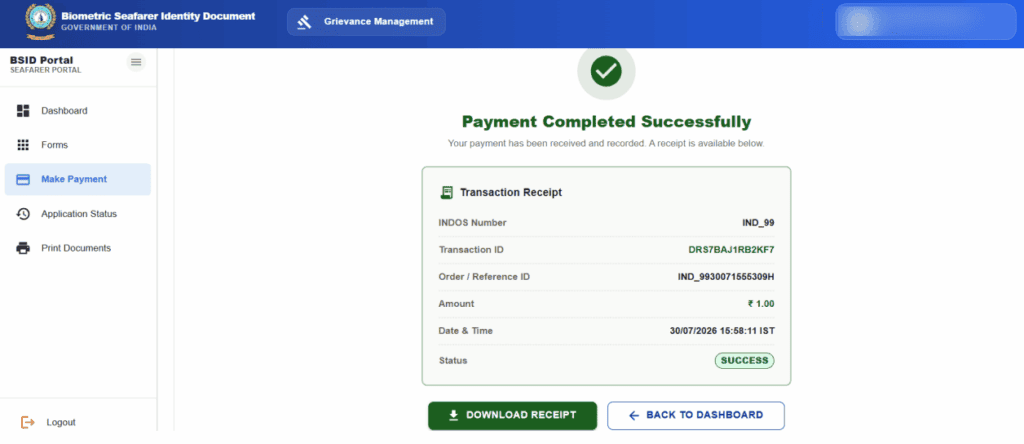
The receipt shows your INDoS number, transaction ID, order/reference ID, amount paid, payment mode, date and time, and status.
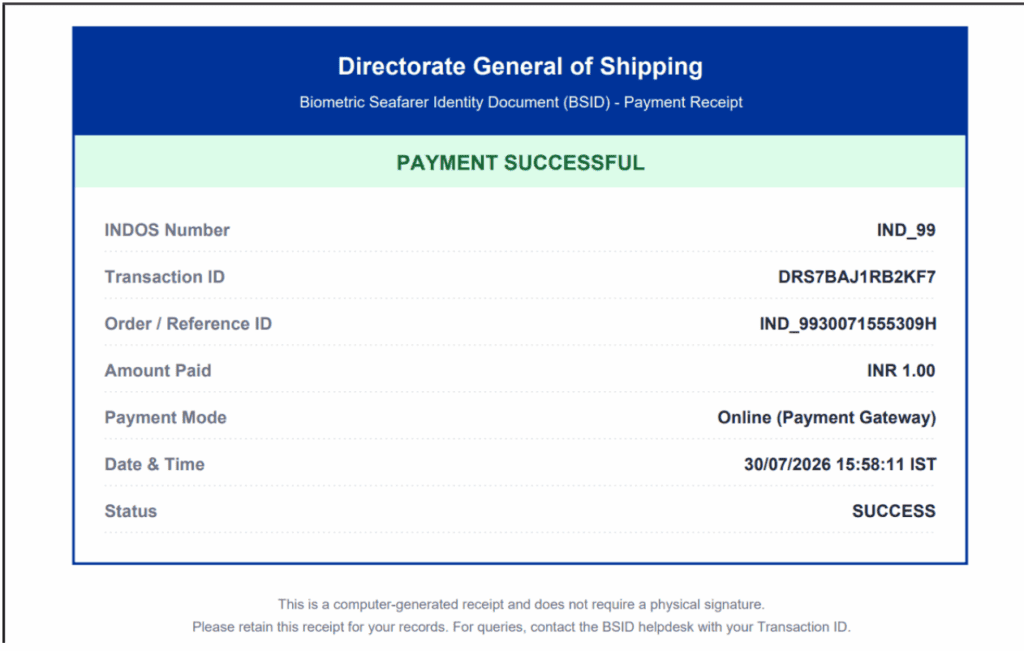
Tip: If the payment doesn’t reflect immediately, wait 1 to 2 working days. Do not make a duplicate payment. If there’s a payment issue, contact the BSID helpdesk with your transaction ID.
Step 10: Schedule Your Appointment
After payment is processed, go to Forms and select Schedule Appointment. The scheduling process works in four steps:
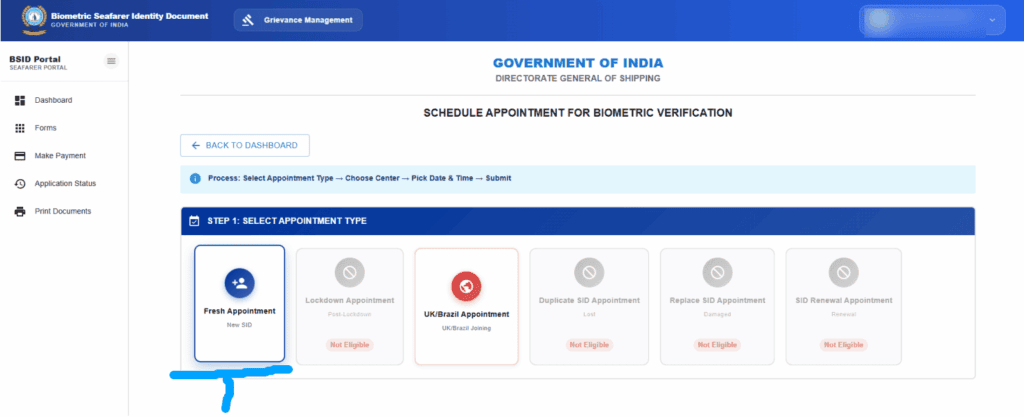
Step 1: Select Appointment Type — Choose Fresh Appointment, UK/Brazil Appointment, Duplicate SID Appointment, Replace SID Appointment, or SID Renewal Appointment based on what you applied for.
Options you’re not eligible for will appear greyed out.
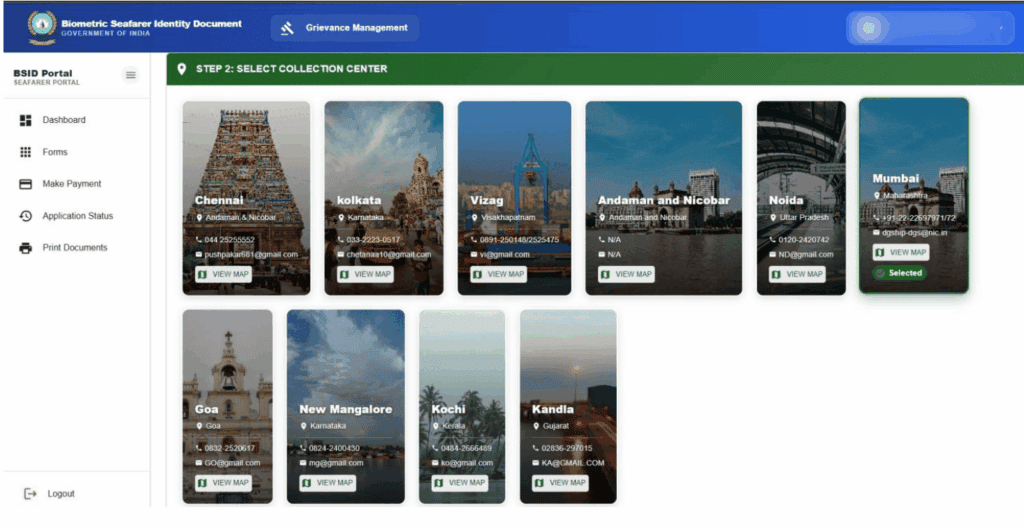
Step 2: Select Collection Centre — Choose from the available centres across India. Each centre card shows the city name, location, contact number, email, and a ‘View Map’ option.
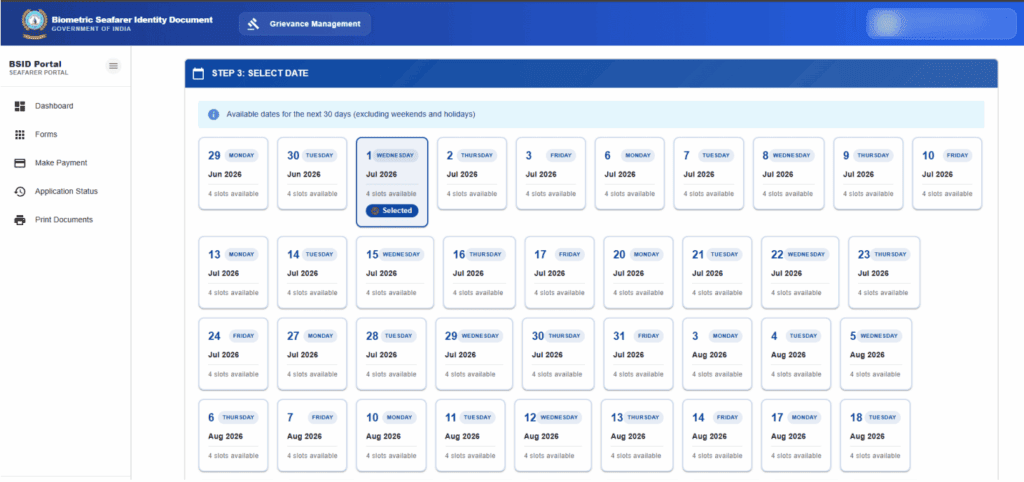
Step 3: Select Date — The calendar shows available dates for the next 30 days (excluding weekends and holidays). Each date displays the number of available slots.
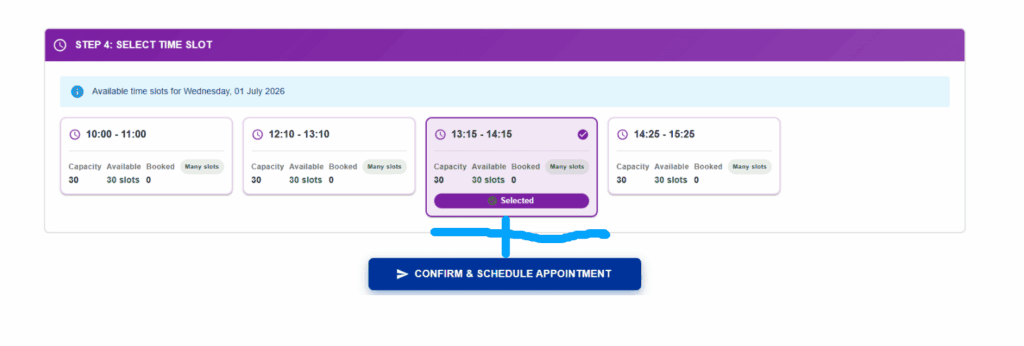
Step 4: Select Time Slot — Choose from the available time slots (e.g., 10:00-11:00, 12:10-13:10, 13:15-14:15, 14:25-15:25). Each slot shows its capacity, available seats, and booked count. Click Confirm & Schedule Appointment.
Tip: Appointments are available approximately 15 days out. Book early for busy centres like Mumbai and Chennai. For UK/Brazil urgent joinings, the express option lets you collect your card the same day (evening) from the Shipping Master offices at Mumbai, Chennai, or Kolkata.
Step 11: Print Your Documents
Go to Print Documents from the left menu and download a PDF of your SID application form. Print this document and carry it to your appointment along with your original passport and original CDC.
Step 12: Visit the Collection Centre for Biometric Data Capturing
Report to your chosen collection centre on the scheduled date and time with all your documents. Here’s what happens at the centre:
The data capturing personnel will examine your original passport and original CDC, verify them against your online application, and return the originals to you. They will then capture your facial biometric data (photograph) and signature. Your live face is cross-matched against your passport photo using facial identification and matching software.
Tip: Arrive on time. Late arrivals risk losing their slot. Keep your face clearly visible (no sunglasses, hat, or face covering). The photo and signature captured here are the ones that appear on your actual SID card, not the ones shown during the online application.
Step 13: Track Your Application and Receive Your Card
After the appointment, go to the Application Status section in the portal to track your card through eight verification stages:
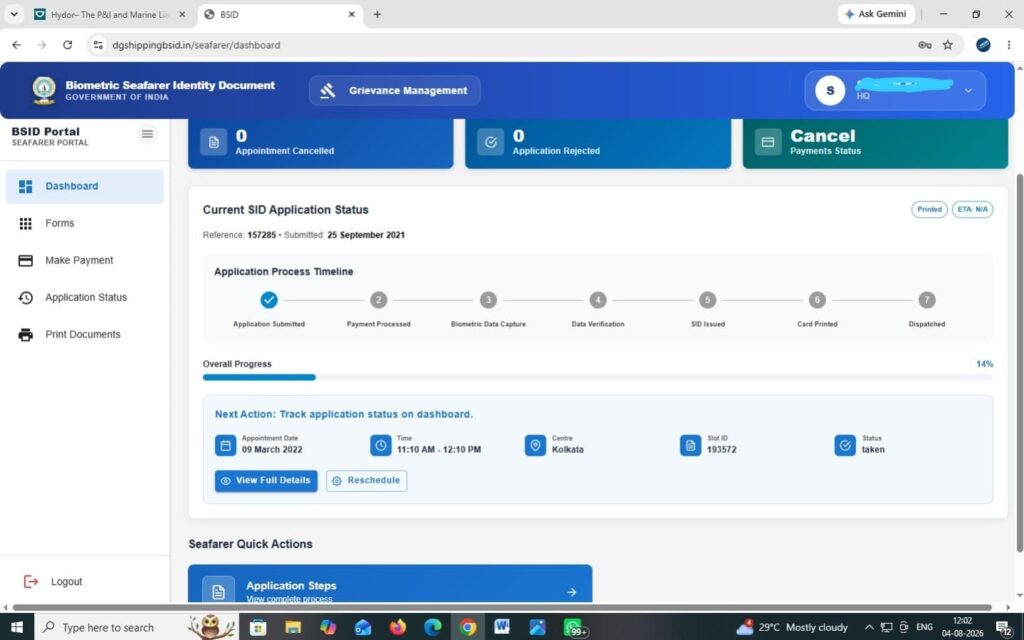
Once the Issuing Officer has issued your SID, you can view your SID card digitally in the Application Status section by clicking View SID Card. The physical card will be dispatched to your registered dispatch address. You’ll receive notifications for important status changes via email and SMS.
Tip: The portal says status updates take about 15 working days. From practical experience, physical card delivery can take 2 weeks to 2 months depending on processing backlog and postal delivery times.
Renewal, Duplicate, and Replace: The Three New Workflows
SID Renewal
If your SID card has expired or has completed its five-year validity period, you can apply for renewal through the portal. Select SID Renewal from the Forms menu. The form pre-fills your existing SID details (SID number, application ID, name, gender, date of birth, place of birth, nationality, and identification marks) as read-only. Verify the details, accept the Purpose Limitation Compliance and declaration, then click Submit Renewal. After submission, complete the payment and schedule a Renewal SID Appointment at your preferred collection centre.
Duplicate SID (Lost or Damaged Card)
If your SID card is lost, damaged, or unusable, select Duplicate SID Request from the Forms menu. You’ll need to enter your FIR/complaint number, date, police station name, country, state, and district, then upload a copy of the FIR or complaint (PDF or image format). Click Submit Duplicate Request. After submission, complete the payment and schedule a Duplicate SID Appointment. Once approved by the Issuing Officer, the duplicate card is dispatched to your correspondence address.
Replace SID (Corrections to Card Details)
If you need corrections or modifications to the details printed on your existing SID card, select Replace SID Request from the Forms menu. Select the reason for replacement, upload a copy of your existing SID card and any supporting document relevant to the correction (PDF or image format, max 2 MB), then click Submit Replace Request. After submission, complete the payment and schedule a Replace SID Appointment.
Important note for all three: if you have an existing appointment that hasn’t been used yet, you’ll need to cancel it before scheduling a new one.
BSID Data Collection Centres Across India
The BSID 2.0 portal lists the following data collection centres. You can choose any centre regardless of where your CDC was issued:
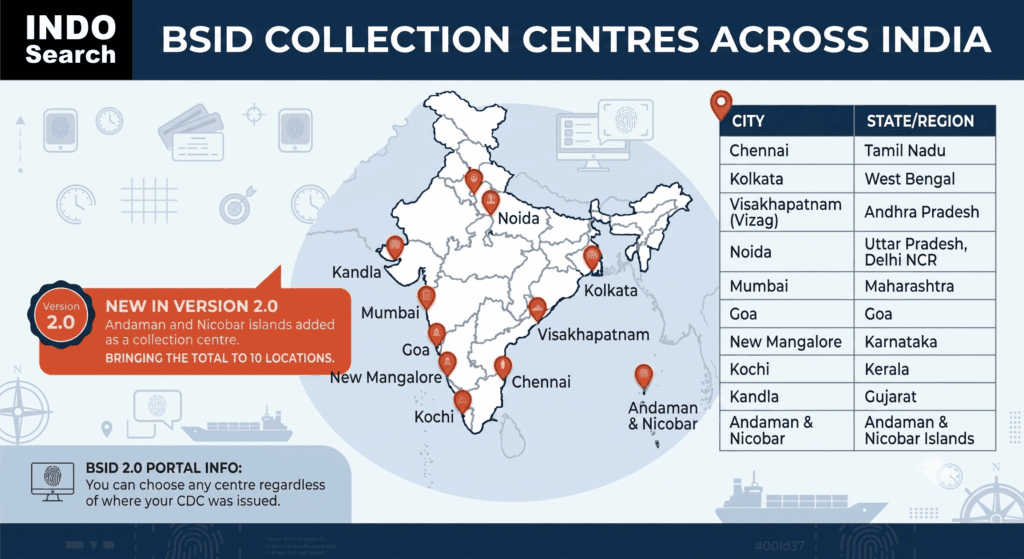
BSID Data Collection Centres Across India with Full Addresses, Contact Numbers & Email IDs
Source: Official MMD/DGMA Records | BSID Version 2.0 Portal | August 2026
| Sr. | Centre (State) | Full Address | Contact No. | Email ID |
| 1 | Chennai (Tamil Nadu) | Govt. Shipping Office, Anchorgate Building, 2nd Floor, P.B. No. 5004, Rajaji Salai, Chennai – 600 001 | 044-25255555 / 25233336 | chennai-mmd@gov.in |
| 2 | Kolkata (West Bengal) | Govt. Shipping Office, Marine House, Hastings, Kolkata – 700 022 | 033-2223 0236/37/38 | pommd.kol-wb@gov.in |
| 3 | Vizag (Andhra Pradesh) | MMD Visakhapatnam, # 7-8-26/A, Harbour Park Down, Visakhapatnam – 530 003 | 0891-2502148 / 2525475 | mmdvizag@gmail.com |
| 4 | Andaman & Nicobar (A&N Islands) | MMD Port Blair, GPRA Lamba Lane, Junglighat P.O., Port Blair – 744 101 | 03192-232530 | mmdportblair@gmail.com |
| 5 | Noida (Delhi NCR) | MMD Noida, IWAI Bhawan, 3rd Floor, A-13, Sector-1, Noida – 201 301 | 0120-2420742 | mmdnoida@gmail.com |
| 6 | Mumbai (Maharashtra) | Govt. Shipping Office, Nau Bhavan Building, 10, R.K. Marg, Ballard Estate, Mumbai – 400 001 | 022-2269 7971/7972 | mumbai-mmd@gov.in |
| 7 | Goa (Goa) | MMD Goa, Mercantile Marine Department, Headland Sada, Goa – 403 804 | 0832-2520617 | mmdgoa@sancharnet.in |
| 8 | New Mangalore (Karnataka) | MMD Mangalore, Type V Qtrs., 1st Floor, MMD Resi Qtr. Bldg, 23rd Street, Panambur, Mangalore – 575 010 | 0824-2400430 / 2407572 | mlr-sicmmd@gov.in |
| 9 | Kochi (Kerala) | MMD Kochi, Willington Island, North End P.O., Kochi – 682 009 | 0484-2666489 / 2587000 | kochi-mmd@gov.in |
| 10 | Kandla (Gujarat) | MMD Kandla, Plot No. 16, Sector-8, Govt. Office Area, Behind KPT Admin Bldg, Near Maitri Bhavan, Gandhidham – 370 201 | 02836-297015 / 297127 | kandla-mmd@gov.in |
Important Notes:
• Andaman & Nicobar Islands is a new addition in BSID Version 2.0, bringing the total to 10 collection centres across India.
• Seafarers can choose any collection centre regardless of where their CDC was issued or where they reside.
• The Shipping Master offices at Mumbai, Kolkata, and Chennai are the designated issuing authorities for BSID cards.
• For UK/Brazil express appointments, same-day card collection is available only at Mumbai, Chennai, and Kolkata.
• Addresses and contacts are sourced from official DGMA/MMD records (mmd.gov.in). Please verify with the respective office before visiting, as offices may relocate.
Why DGMA Rolled Out BSID Version 2.0
The original BSID module went live on 5th April 2019 and handled initial card issuance well enough, but cracks showed as the system scaled. DGMA Circular No. 44 of 2026 flags three core problems that forced the upgrade. They were namely, outdated issuing software that couldn’t keep up with maritime demands, zero online provisioning for renewals, replacements, or duplicate cards (which left seafarers stranded at foreign ports and sometimes triggered fines on their vessels), and the need to stay compliant with evolving ILO Convention No. 185 standards.
One important thing to note: if you already hold a valid BSID, you don’t need to do anything. Existing cards remain valid until their expiry date. Version 2.0 only applies to fresh applications, renewals, duplicate requests, and replacements processed from 1st August 2026 onward.
What’s New in BSID Version 2.0?
Version 2.0 isn’t just a cosmetic refresh. It adds features that were entirely missing from the original system and fixes workflows that caused real problems for seafarers:
| Feature | Old System (V1.0) | New System (V2.0) |
| Login | INDoS number + password only | INDoS number + password + OTP verification on registered mobile |
| Fresh SID Application | Available | Available with improved interface |
| SID Renewal | Not available online | Now available: dedicated renewal form with existing SID details pre-filled |
| Duplicate SID (Lost/Damaged) | Not available online | Now available: requires FIR/complaint upload, dispatched without new appointment in some cases |
| Replace SID (Corrections) | Not available online | Now available: upload existing SID + supporting documents (PDF/image, max 2 MB) |
| Application Dashboard | Basic | Visual timeline tracking: Application Submitted → Payment Processed → Biometric Data Capture → Data Verification → SID Issued → Card Printed → Dispatched |
| Appointment Types | Fresh only | Fresh, Lockdown, UK/Brazil, Duplicate SID, Replace SID, SID Renewal |
| Payment Gateway | Basic | Upgraded via BillDesk with receipt download |
| Data Protection | Not specified | Explicit consent under Digital Personal Data Protection Act, 2023 |
| Cancellation Policy | Up to 2 cancellations | Up to 3 cancellations before verification; after that, re-payment required |
| Facial Biometrics | Available | Upgraded technology with better accuracy |
| Grievance Management | Not available in portal | Built-in grievance management module |
The biggest practical impact is the addition of renewal, duplicate, and replace requests. Before Version 2.0, if your BSID expired or was lost, you were stuck in a process that caused delays at foreign ports. Now you can handle all of this from the same portal.
BSID Eligibility Criteria: Who Can Apply?
Not every Indian citizen can apply for a BSID. The card is specifically for seafarers, and the eligibility criteria are straightforward:
| Requirement | Details |
| Nationality | Must be an Indian citizen |
| CDC | Must hold a valid Continuous Discharge Certificate (CDC) issued by the Government of India |
| Passport | Must hold a valid Indian passport |
| INDoS Registration | Must have an active INDoS number with up-to-date profile |
| Debarment Status | Must not be debarred from CDC or SID |
That’s it. No age limit, no minimum sea service requirement, and no specific rank restriction. If you have a valid Indian CDC and passport, you qualify. This includes seafarers who’ve just completed their training at a DGMA-approved maritime training institute and received their first CDC, as well as experienced officers and ratings.
Check out the updated 2026 CDC eligibility criteria and new DGMA rules here.
Documents Required for BSID Application
Before you begin, make sure you have your original Indian passport, original CDC, INDoS login credentials, and access to your registered mobile number for OTP verification. After completing the online form, print the application and download your payment receipt, as you’ll need both at the collection centre along with your originals. If you’re applying for a duplicate SID, you’ll also need to upload a copy of your FIR or police complaint during the application. For a replacement SID, upload a copy of your existing card and any supporting document for the correction (PDF or image, max 2 MB).
Appointment Cancellation Policy
Under BSID Version 2.0, you can cancel a scheduled appointment only until it has been verified by the Verification Officer. A maximum of three appointment cancellations is permitted. Once this limit is exceeded, you’ll need to make a fresh payment before booking a new appointment. This is stricter documentation than the old policy but more clearly enforced through the new portal.
Common Mistakes and Quick Tips
- Mismatched data between your INDoS profile, CDC, and passport will get your application rejected. Verify everything matches before you apply.
- Keep your registered mobile number current. BSID 2.0 requires OTP login, so no working number means no portal access.
- The photo in the online form is from your INDoS profile, not your final card. Your actual SID photo and signature are captured at the collection centre.
- If your payment doesn’t reflect right away, wait 1 to 2 working days. Don’t pay again. Contact the BSID helpdesk with your transaction ID instead.
- Carry your original passport, original CDC, and printed application form to the appointment. Miss any one and the trip is wasted.
- You get 3 appointment cancellations max. After that, you pay again. Book a date you can actually show up for.
Key Takeaways
Here are the essential points every Indian seafarer should know:
• DGMA Circular No. 44 of 2026 introduces BSID Version 2.0, effective 1st August 2026, with upgraded software, facial biometrics, and new online workflows.
• Version 2.0 adds renewal, duplicate, and replace card requests online, features that were entirely missing from the old system.
• Existing BSIDs remain valid until expiry. No action needed from current card holders.
• Login now requires OTP verification on your registered mobile number.
• 10 data collection centres across India, including Andaman and Nicobar (new).
• Application tracking through an 8-stage timeline from submission to dispatch.
• Maximum 3 appointment cancellations before re-payment is required.
• Over 4 lakh BSIDs issued since 2019, the system is well-established.
• The application is entirely self-service. Never pay agents or middlemen.
• Data protection: the portal now explicitly follows the Digital Personal Data Protection Act, 2023.
Frequently Asked Questions
1. What is the application fee for a fresh BSID card?
The fee for a fresh BSID application is ₹300, payable online through the BSID portal via credit card, debit card, net banking, or wallets. The payment is processed through the BillDesk gateway.
2. Is the BSID card dispatch free or does it cost extra?
Card dispatch via Speed Post AD is included in the application fee. There is no separate delivery charge.
3. What happens if I cancel my appointment? Do I have to pay again?
You can cancel up to 3 times without paying again, as long as the appointment hasn’t been verified by the Verification Officer. After the third cancellation, you’ll need to make a fresh payment before booking a new appointment.
4. Do I need to pay an agent or middleman for BSID processing?
No. The entire process is self-service through the official portal. The only fee is the one you pay online. Anyone demanding additional payment for BSID processing is not authorised.
5. How long does it take to get the BSID card after the biometric appointment?
According to DGMA, the card is printed and dispatched via Speed Post AD within 2 working days of issuance. However, actual delivery to your address can take anywhere from 2 weeks to 2 months depending on the processing backlog and postal delivery timelines.
6. How long does data verification for BSID card take?
The portal indicates that application status updates are provided within 15 working days. Data verification for BSID card depends on the Verification Officer’s queue and can vary by collection centre.
7. Can I get my BSID card on the same day?
Only if you select the UK/Brazil Appointment option, which is meant for seafarers urgently joining vessels at UK or Brazilian ports. In that case, you can collect the card the same day (evening) from the Shipping Master offices at Mumbai, Chennai, or Kolkata.
8. Is the Lockdown Appointment option free?
Yes. The Lockdown Appointment option on the portal shows as free (₹0). This is a special provision made during restricted periods and may not always be available.
9. What if my payment doesn’t reflect on the portal?
Wait 1 to 2 working days. Do not make a duplicate payment. If it still doesn’t appear, contact the BSID helpdesk at the email shown on your payment receipt, quoting your transaction ID and INDoS number.
10. How to get BSID card for the first time?
Update your INDoS profile, log into the BSID 2.0 portal with OTP verification, complete the application form, make the payment, schedule an appointment at a collection centre, attend the appointment with your original passport and CDC, and wait for the card to be dispatched via Speed Post.
11. What is BSID Version 2.0?
BSID Version 2.0 is the upgraded platform rolled out under DGMA Circular No. 44 of 2026, effective 1st August 2026. It brings improved facial biometrics, OTP-based login, and adds online renewal, duplicate, and replace card workflows that weren’t available before.
12. Is the BSID card mandatory for Indian seafarers?
Yes. Every Indian seafarer working on merchant vessels must have a valid BSID. Without it, you cannot be cleared to join a ship.
13. Do I need to get a new card because of Version 2.0?
No. Existing BSIDs remain valid until their respective expiry dates. The circular explicitly states that no action is required from seafarers holding a valid BSID card.
14. How long is the BSID valid?
The BSID is valid for 10 years from the date of issuance, with a mandatory renewal required after the first 5 years.
15. What if my BSID card is lost or damaged?
Under Version 2.0, you can now apply for a Duplicate SID Request through the portal. You’ll need to upload a copy of your FIR or police complaint, complete the payment, and schedule a Duplicate SID Appointment.
16. Can I correct details on my existing BSID?
Yes. Use the Replace SID Request option in the portal. Upload your existing SID and the supporting document for the correction (PDF or image, max 2 MB), then complete the payment and schedule a Replace SID Appointment.
17. What documents do I need for the BSID appointment?
Carry your original Indian passport, original Indian CDC, and the printed application form from the portal. For duplicate requests, also carry the FIR/complaint copy.
18. In which country is BSID compulsory for seafarers?
Currently BSID (Biometric Seafarer’s Identity Document) is compulsory for seafarers working on vessels calling at Brazilian ports. The requirement applies to both seafarers and riding squad personnel. Without a valid BSID, Brazilian authorities may not permit the individual to sign on or sign off the vessel at a Brazilian port.
Conclusion
BSID Version 2.0, introduced via DGMA Circular No. 44 of 2026, fixes the gaps that made the original system frustrating for Indian seafarers. The core improvement is practical: renewal, duplicate, and replacement requests can now be handled online instead of through an offline process that caused delays at ports and sometimes penalties on vessels. The addition of OTP-based authentication, an 8-stage application tracker, and a built-in grievance module are meaningful upgrades. Existing card holders don’t need to do anything until their card comes up for renewal.
If you’re new to the maritime industry and haven’t started your documentation process, begin with your INDoS registration, then secure your CDC through an approved maritime training institute, and apply for BSID immediately after. If you’re an experienced seafarer due for renewal, start that process now through the upgraded portal.
Need help finding an approved MTI near you? Explore the Indo Search directory for verified information on dg-shipping (now DGMA) approved maritime training courses and training institutes across India. For seafarer welfare benefits, see our guide on SWFS welfare schemes.